![iam small logo.png]](https://support.iamcompliant.com/hs-fs/hubfs/iam%20small%20logo.png?height=50&name=iam%20small%20logo.png)
iAM Medical is available to customers with a full iAM subscription Advanced or equivalent and a Wonde connection included in their package.
If you already have both, you can enable iAM Medical whenever you're ready.
How to enable iAM Medical
1. Log in to your iAM account.
2. Navigate to Account Settings.
3. Select Tools.
4. Find Medical and tick the option to enable it.
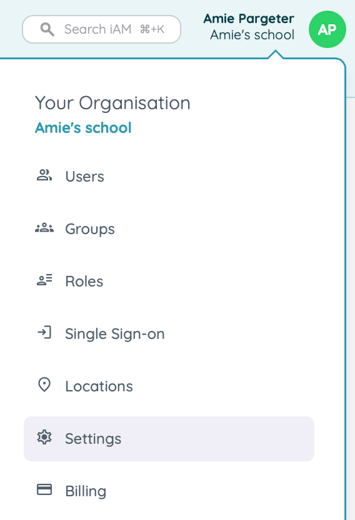
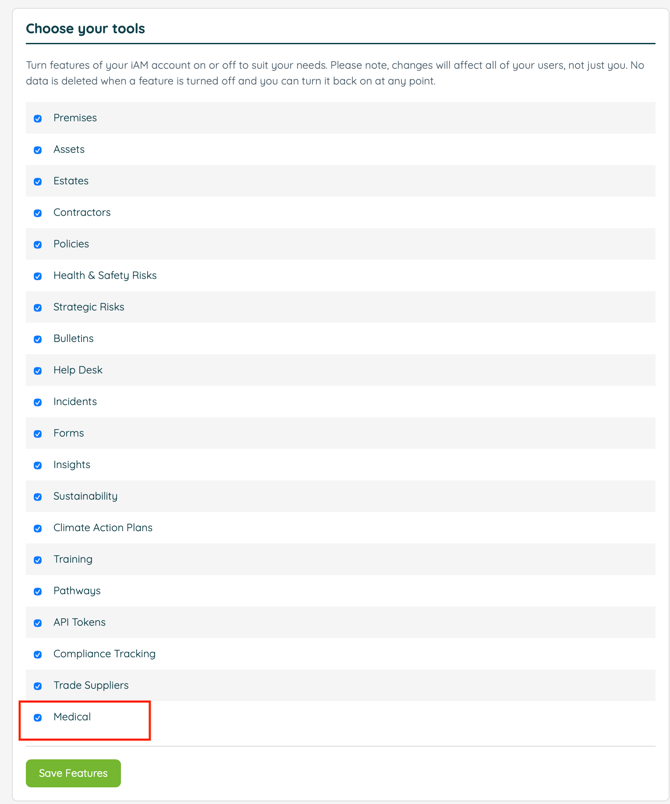
Once enabled, you can begin exploring and using iAM Medical within your account.
Before enabling iAM Medical
We recommend reviewing your existing user roles and permissions to ensure that only the appropriate people have access to sensitive medical information.
You may also wish to create a new role specifically for iAM Medical, allowing you to manage access and permissions for staff who need to use the feature.
It may also worth discussing the feature with your Data Protection Officer (DPO) should you wish to discuss your school's or trust's data protection policies. We have some information here on Data from Wonde.
How can I check my current subscription?
If you're an Account Owner, you can check your current subscription by navigating to the Billing section within your account settings, where you should be able to see your subscription type.
If you're unsure which package you're on or have any questions about what's included, please get in touch with our Customer Team, who'll be happy to help.
Don't have a Wonde connection yet?
If Wonde isn't in your package and you would like to add this, our team would be happy to help you explore adding it so you can make full use of iAM Medical.
Connecting through Wonde offers several benefits, helping to view relevant accurate pupil information and easily accessible within iAM.
Interested in adding Wonde to your subscription?
Simply get in touch with our team, who'll be happy to explain the benefits and help you get connected.
I'm on Essentials – how can I access iAM Medical?
iAM Medical is available as part of our Advanced subscription. If you're currently on Essentials and would like to start using the feature, our team would be happy to talk you through your upgrade options.
Upgrading to Advanced unlocks additional functionality designed to help you manage compliance more effectively, including iAM Medical, advanced incident management workflows and MIS integration via wonde.
Interested in upgrading from Essentials?
Simply contact our team, and we'll be happy to explain the additional benefits of Advanced and help you find the right option for your school or trust.
For further guidance on iAM Medical, see our selection of guides