![iam small logo.png]](https://support.iamcompliant.com/hs-fs/hubfs/iam%20small%20logo.png?height=50&name=iam%20small%20logo.png)
When a pupil receives a scheduled dose of medication, you can simply record the administration in iAM to maintain an accurate history of what was given, when it was given and who recorded it.
To record a scheduled dose:
-
Go to Incidents > Medication.
-
Locate the medication that is due to be administered.
-
Select Manage.
-
Select Log medication.
-
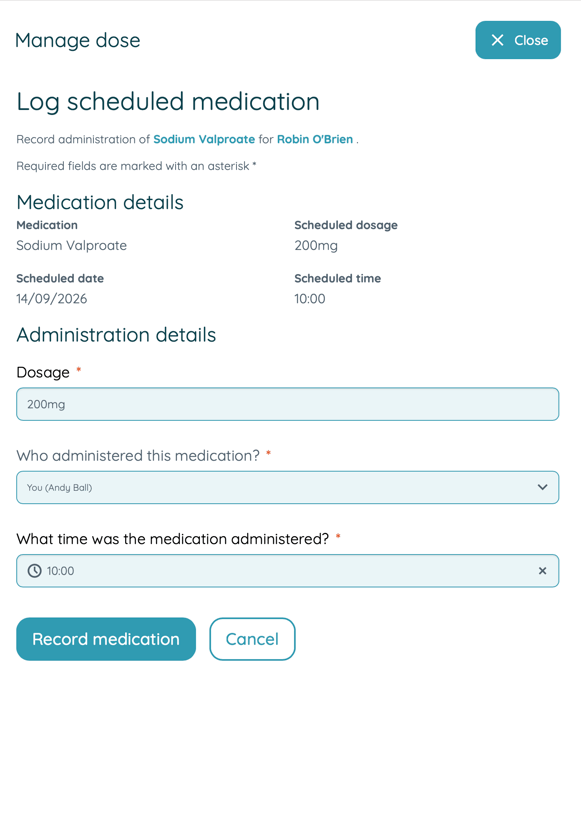
Complete the required information including the dosage, time and who administered the dose.
-
Save the record.
Alternatively, go to Incidents > Register, select the pupil, open the Medication tab and you can manage the relevant medication from there.
Note: Medication can only be recorded once the scheduled due date and time has been reached. You cannot record a dose as administered in advance by selecting a future date or time.
What information is recorded?
Once the dose is recorded, the administration record provides an up-to-date audit trail of the medication activity, including when the medication was administered, the dosage given and the user who administered it.
What if the medication was not given?
Do not record it as administered. Instead, use the option to Skip this dose and record the reason it was not administered.