![iam small logo.png]](https://support.iamcompliant.com/hs-fs/hubfs/iam%20small%20logo.png?height=50&name=iam%20small%20logo.png)
Important Information Before You Start
Before you upload a certificate, an Account Owner, Location Manager (or another user with Manage Training access) must first create the training record via CSV upload.
Uploading a Certificate
Note: The course must appear in your training area before a certificate can be added against the record. You will not be able to upload a certificate unless the training record already exists.
Once your training record has been created, you can upload your certificate.
Simply head to Training > My Certificates
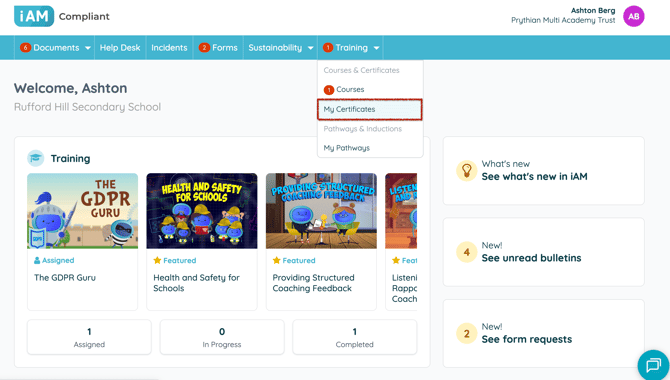
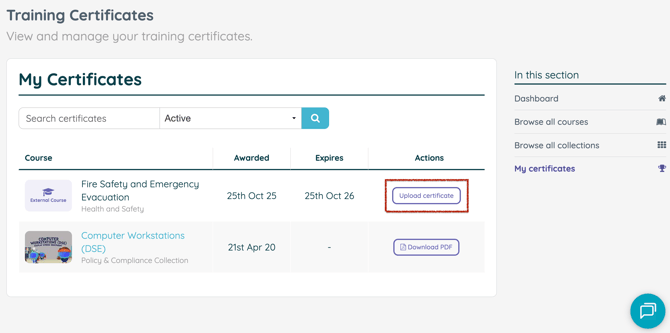
Here you can view your awarded training. To upload a copy of a certificate, simply select ‘Upload Certificate'
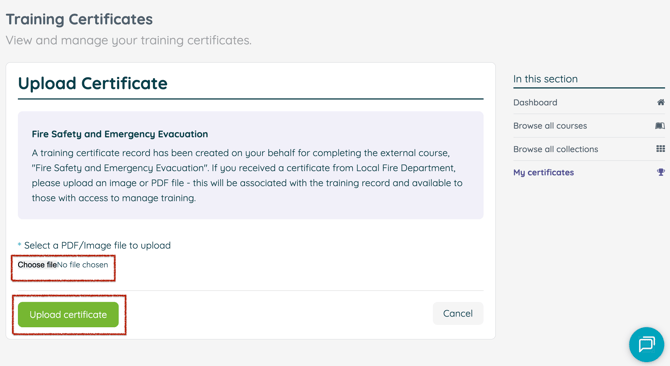
Upload your certificate by selecting a PDF or image file and click ‘Upload Certificate.’
Once uploaded, your certificate will appear against the relevant training record for easy access. You can download a copy at any time, and it will also be available to a Training Manager.