![iam small logo.png]](https://support.iamcompliant.com/hs-fs/hubfs/iam%20small%20logo.png?height=50&name=iam%20small%20logo.png)
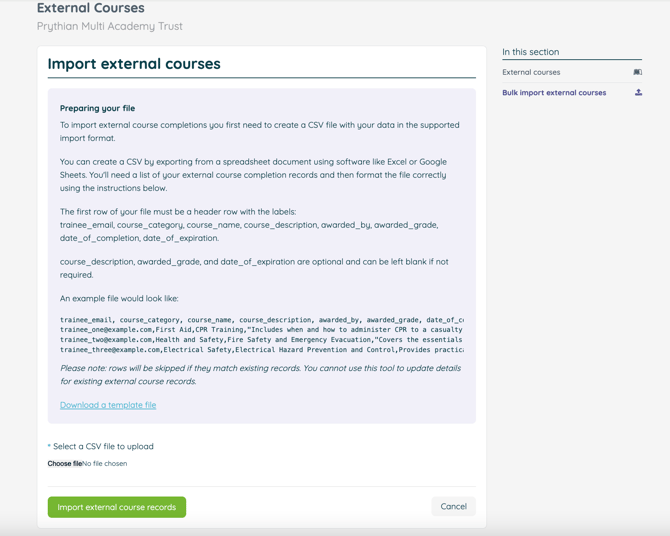
To do this successfully you must create a CSV file with your completion records in the supported import format before uploading it.
Simply head to Training >External Certificates
We have provided instructions for the format required for importing your records and have provided a handy downloadable template file.
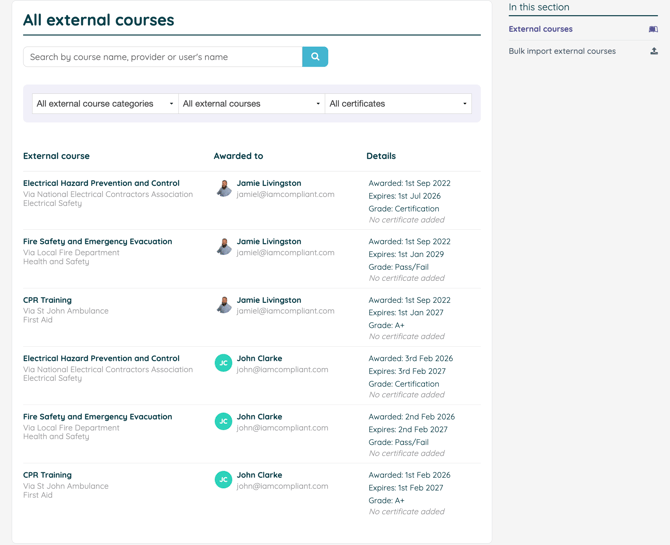
After an external course has been successfully imported, it will appear in your External Courses list.
From here, you can:
-
View all external course records
-
Filter your view to quickly find specific records
See which certificates are:
-
Expiring soon
-
Already expired
-
Currently in date
As well as filter results by course category.
Using the filtering options allows you to quickly monitor status and identify any training that requires renewal.
Employees also have the opportunity to showcase their accomplishments by uploading evidence of completion, such as certificates or award documents. They can simply upload a PDF or image of the certificate obtained, and it will be stored alongside the external training record you import.