![iam small logo.png]](https://support.iamcompliant.com/hs-fs/hubfs/iam%20small%20logo.png?height=50&name=iam%20small%20logo.png)
Authorised users can upload supporting documents to a pupil or staff member’s Medical Register, helping keep important medical information easy to find in one place.
To add a document:
-
Go to Incidents > Register.
-
Find and select the relevant pupil or staff member.
-
Open the Documents tab.
-
Select Add new document
-
Choose the file you want to add - files must be in one of the following formats:
PDF, DOC, DOCX, JPG, JPEG, PNG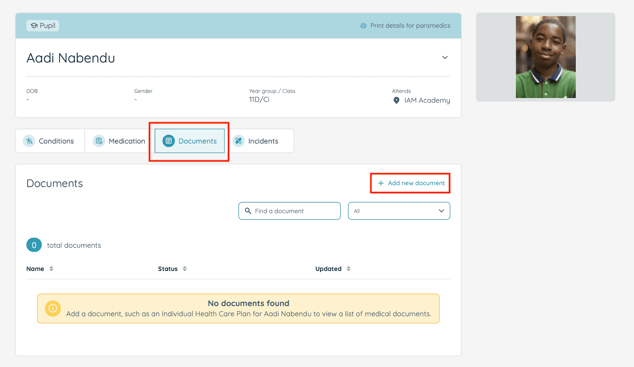
-
Add any required details or description as well as any review dates that relate to the document.
-
Save the document to the individual’s record.
-
Once uploaded, the document will be available from the individual’s Medical Register to users with the appropriate permissions.
What types of documents can I add?
You can use the medical documents area to store relevant supporting medical information, such as:
-
Individual healthcare or care plans
-
Allergy or emergency action plans
-
Medical letters or supporting notes
-
Medication related documentation
-
Other relevant health or medical records
Can I view or download a document later?
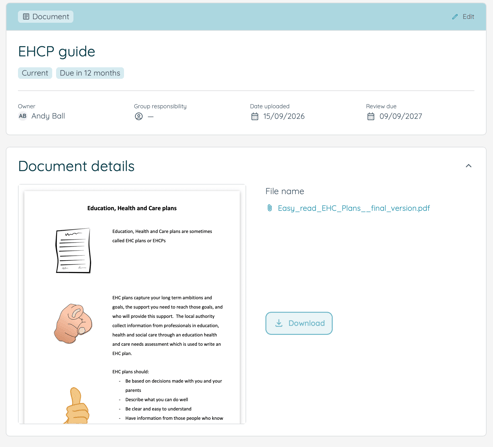
Yes. Open the individual’s record and go to the medical documents tab. Select the relevant document to view it and, where available, download a copy.
Who can access medical documents?
Access to medical information and supporting documents is controlled by user permissions. If you cannot see the medical documents area or the option to upload a file and you believe you should, speak to your organisation’s iAM account owner.